








Google Shopping Ads Agency
The Feed Is the Product

We treat your product feed as the foundation, not an afterthought. Google Shopping & PMax campaigns built for real, bankable ROAS.

Google Shopping Ads Agency — Where Your Product Feed Becomes Profit

Google Shopping lives or dies on one thing most agencies barely mention: your product feed. You can have the budget, the bids, and the campaigns perfectly set — but if your feed is thin, your titles are weak, or half your catalogue is sitting disapproved in Merchant Center, none of it matters. The feed is the product.

We’re ADS That Matters, a Google Shopping ads agency that treats the feed as the foundation, not an afterthought. We fix what’s disapproved, rebuild titles and attributes so your products actually surface, and run Performance Max and Standard Shopping campaigns against a Target ROAS you can bank on — not a dashboard full of clicks that never became sales.

What is a Google Shopping ads agency?

A Google Shopping ads agency manages the product listings that appear at the top of Google with your image, price, and store name. That means optimizing your product data feed, managing Google Merchant Center, building and running Performance Max and Standard Shopping campaigns, and bidding to a Target ROAS — so your catalogue reaches ready-to-buy shoppers at a profitable cost. Because the feed powers everything, feed quality decides Shopping performance more than budget does.

What does it cost?

Google Shopping management is usually priced as a percentage of ad spend (commonly 10–20%) or a flat retainer ($500–$4,000+/month), separate from the budget that goes to Google. Feed work is often included in onboarding. Full breakdown below.

Google Premier Partner • Google Merchant Center verified — the tiers Google reserves for agencies that meet real performance and spend thresholds.

974+ Shopping accounts managed • $22M+ ecommerce revenue driven • 9.2x average ROAS • 95%+ client retention

What are Google Shopping ads, and how do they work?

Google Shopping ads are the product listings that show at the top of a search — the ones with a product image, price, store name, and reviews, before anyone scrolls to the text results. Unlike a regular Search ad, you don’t write them or bid on keywords directly. Google builds them automatically from your product data feed in Google Merchant Center, then matches your products to relevant searches based on what’s in that feed.

That’s the part most businesses miss, and the reason a Google Shopping agency earns its fee: you don’t control Shopping through keywords, you control it through your feed. Better titles, cleaner attributes, and accurate data get your products into more of the right searches at a lower cost. A neglected feed does the opposite — quietly, and expensively.

Google Shopping glossary

Term What It Actually Means
Product Feed The spreadsheet/data file of all your products that powers your Shopping ads.
Google Merchant Center (GMC) Where your feed lives and gets approved to run.
GTIN / MPN Global Trade Item Number and Manufacturer Part Number — product IDs Google wants.
Performance Max (PMax) Google's AI campaign type that now runs most Shopping (replaced Smart Shopping).
Standard Shopping The manual campaign type, where you keep direct control of bids and structure.
Target ROAS (tROAS) The return-on-ad-spend goal you set for Smart Bidding to optimize toward.
Product Disapproval A product blocked from showing due to a feed or policy issue.
Custom Labels Tags you add to the feed to group products for bidding (e.g. margin, season).
Local Inventory Ads (LIA) Shopping ads showing in-store stock to nearby shoppers.
Free Listings Unpaid product listings across the Shopping tab.

Google Shopping vs Search ads which does a product business need?

They look similar and run in the same account, but they convert differently, and the smartest ecommerce setups use both deliberately rather than choosing one.

Google Shopping Search (Text) Ads
Powered By Your product feed Keywords you choose
Shows Image, price, store name Text headline + description
Best For Products with clear intent to buy Category terms, brand defence, non-product queries
Buyer Stage Ready to purchase — comparing products Researching or searching broadly
Who Controls Matching Google, via feed relevance You, via keywords & match types

For most online stores, Shopping does the heavy lifting on product searches while Search protects your brand and captures the queries a product listing can’t. We’ll map the split to your catalogue — see our Google Ads services → for the text-search side.

Your product feed: where Shopping is won or lost

Every agency says “feed optimization.” Almost none explain it, because it’s detailed, unglamorous work — and it’s exactly where the results come from. Here’s what actually moves the needle.

The attributes that decide whether you show — and where:

  • Product titles — the single highest-leverage lever in Shopping. Google reads the title to match your product to searches, so a title structured as Brand + Product + Key Attribute + Size/Colour will surface for far more relevant queries than “Blue Shirt.”
  • Product descriptions — secondary matching signals; we write them for search relevance, not just for humans.
  • GTIN, MPN & brand — the identifiers Google uses to understand exactly what you’re selling; missing or wrong ones suppress reach.
  • Google product category & product type — correct categorisation puts you in the right comparison set instead of the wrong one.
  • Images — clean, policy-compliant, high-quality images that win the click against the listing next to yours.
  • Price, availability & sale price — must match your site exactly, or the product gets disapproved.

And the work most agencies skip:

  • Custom labels for bidding — tagging products by margin, price band, bestseller status, or season, so we can bid harder on what actually makes you money instead of treating the whole catalogue the same.
  • Feed rules & supplemental feeds — fixing and enriching data at scale without rebuilding your whole catalogue.
  • Ongoing feed monitoring — because a feed isn’t set-and-forget; prices, stock, and approvals change daily.

Get the feed right and everything downstream — bidding, budget, ROAS — gets easier. Get it wrong and no amount of bid tweaking will save the account.

Merchant Center, approvals, and the disapprovals that kill Shopping accounts

Nothing stops a Shopping campaign faster than products sitting disapproved in Google Merchant Center — and for many stores, a chunk of the catalogue is disapproved right now without anyone realising. You can’t sell what Google won’t show.

We set up and manage Merchant Center properly: account verification, website claim, shipping and tax settings, and the policies that get accounts suspended if you get them wrong. Then we work through the disapprovals, which are almost always one of a handful of fixable issues:

  • Price or availability mismatches between your feed and your live product pages
  • Missing GTINs or incorrect product identifiers
  • Image policy issues — promotional overlays, watermarks, or placeholder images
  • Misrepresentation and policy flags — often from missing contact info, unclear returns, or checkout problems
  • Full account suspension — the worst case, which needs careful, fast remediation rather than repeated resubmission

Fixing disapprovals is usually the single fastest win in a new account — it puts products that were invisible back in front of buyers, sometimes within days.

Shopping campaign types — done the current way

If an agency is still talking about “Smart Shopping campaigns,” their playbook is out of date: Smart Shopping was folded into Performance Max years ago. Here’s what we actually run.

  • Performance Max (PMax) for Shopping — Google’s AI campaign type that now drives most Shopping, serving your products across Search, Shopping, Display, YouTube, and Gmail. Powerful, but a black box by default — so we control it with feed-only vs asset-based structure, audience signals, listing groups, and brand exclusions, rather than switching it on and hoping.
  • Standard Shopping — the manual campaign type, still the right call when you need direct control over bids, priority settings, and exactly which products get budget. Often run alongside PMax, not instead of it.
  • Local inventory ads (LIA) — for brick-and-mortar and omni-channel retailers, showing nearby shoppers what’s in stock in your actual store. Underused, and a genuine edge for multi-location businesses.
  • Free product listings — unpaid placements across the Shopping tab that we make sure your feed qualifies for, because free traffic is still traffic.

Bidding and structure that protect your margin

Great feed, wrong bidding, and you still lose money. Here’s how we run the numbers:

  • Target ROAS (tROAS) — setting and steering the return goal so Smart Bidding chases profit, not just conversions
  • Maximize conversion value — where scaling revenue matters more than a fixed return, within guardrails
  • Product segmentation with custom labels — bidding harder on high-margin and bestselling products, pulling budget from the ones that don’t pay
  • New-customer acquisition goals — valuing a first-time buyer differently from a repeat one, so you’re growing the business, not just re-buying existing customers
  • Budget allocation across PMax and Standard — so the two campaign types complement each other instead of bidding against themselves

Everything in our Google Shopping ads management

A serious google shopping ads management engagement runs every layer of the account, not just the campaigns.

Service What It Covers
Feed Build & Optimization Titles, attributes, GTINs, custom labels, feed rules, and supplemental feeds.
Merchant Center Management Setup, verification, disapproval fixes, and policy compliance.
Campaign Build & Strategy Performance Max, Standard Shopping, local inventory ads, and free listings.
Bidding & Budget Target ROAS, maximize conversion value, and product segmentation.
Remarketing & Audiences Dynamic remarketing, Customer Match, and audience signals for PMax.
Reporting Plain-English dashboards on ROAS, revenue, and new-customer value.

Also available: ecommerce Google Ads management across Search and Shopping, one-time feed audits, and Shopping consulting for in-house teams.

Which Shopping setup fits your goal?

If Your Goal Is… Campaign Type Bidding
Maximum profitable revenue Performance Max Target ROAS
Direct control over products & bids Standard Shopping Manual CPC / tROAS
Driving in-store visits & sales Local Inventory Ads tROAS / store visits
Growing the customer base PMax Maximize value + new-customer goal
Scaling a bestseller hard Standard + custom labels Aggressive tROAS

How you'll actually know your Shopping ads worked

Shopping is easier to measure than most channels — the sale is right there — but the numbers still get read wrong. Here’s what we hold ourselves to:

  • ROAS and blended ROAS — platform return, and the honest whole-account number that includes the products PMax quietly cannibalised from organic or brand search
  • New-customer value — separating first-time buyers from repeat purchases, so growth is real and not just re-buying existing customers
  • Revenue and AOV trends — the direction that actually matters over a quarter, not a single day’s ROAS spike
  • Feed health & impression share — leading indicators that catch problems before they show up in revenue

We report the platform’s numbers and the honest ones, and we’ll tell you when Shopping is cannibalising other channels rather than adding new sales.

Real Shopping results

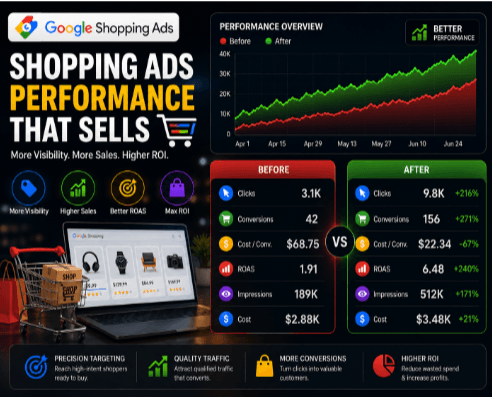
Google Shopping Ads Expert | +271% Conversions | +240% ROAS | 67% Lower Cost/Conversion

Challenge

The client’s Google Shopping campaigns were getting limited visibility and low conversions. High cost per conversion and weak ROAS were eating into the budget without delivering consistent sales.

Solution
I optimized the product feed, restructured Shopping campaigns, refined audience & product group targeting, improved bidding strategy, and focused on high-intent traffic to maximize ROAS and conversions.
Results

Clicks grew from 3.1K to 9.8K (+216%), conversions from 42 to 156 (+271%), cost per conversion dropped from $68.75 to $22.34 (–67%), and ROAS jumped from 1.91 to 6.48 (+240%) while impressions increased 171%.

Where Shopping fits alongside your other sales channels

Your product feed doesn’t have to stop at Google. The same catalogue discipline that wins on Shopping powers your other channels too, and we join them up rather than running them in silos:

  • Amazon, eBay & Etsy — marketplace listings that share the feed discipline and complement, rather than compete with, your Google Shopping presence
  • Meta catalogue ads → — the same product feed driving Advantage+ Shopping and dynamic product ads on Facebook and Instagram
  • Display & remarketing → — dynamic remarketing that shows shoppers the exact products they viewed
One clean feed, working across every channel that sells your products.

What Google Shopping management costs

Your management fee is always separate from the media budget that goes to Google — and with Shopping, there’s one thing worth knowing up front: the product feed is the job, not an upsell. Feed optimization is part of onboarding, not an endless add-on we bill you for forever.

We work across a few models — a percentage of ad spend for ecommerce accounts that scale with revenue, a flat monthly retainer for predictable cost, or a one-time feed build and audit for fixing disapprovals and rebuilding a neglected feed — and we’ll recommend the one that fits. No long-term contract.

Why there’s no management number on this page: a 50-product store and a 50,000-SKU catalogue need completely different amounts of hands-on work, so a single figure would misprice one of them. We scope your price after seeing your catalogue and Merchant Center — then send a clear, custom quote.

Agency, in-house, or do it yourself?

ADS That Matters In-House Hire DIY
Cost % of spend or retainer — full team Salary + benefits + tools "Free" until disapprovals cost you sales
Feed Expertise Attributes, rules, custom labels daily Depends on the hire Usually basic
Disapproval Handling Fast remediation, policy know-how Varies Often stuck for weeks
PMax + Standard Control Both, structured properly One skill set Commonly PMax-on-autopilot
Best For Most stores from SMB to enterprise Very large, always-on catalogues Tiny catalogues testing

Why stores choose ADS That Matters as their Google Shopping management agency

  • You own everything — your Google Ads account, Merchant Center, product feed, and data stay yours. We build inside your assets, never behind a wall.
  • Feed-first, always — we fix what’s disapproved and rebuild the feed before we touch bids, because that’s where the fastest wins are.
  • No long-term contracts — month-to-month, because retention should be earned.
  • A dedicated strategist — a named specialist on your account, not a rotating queue.
  • PMax with a human hand — audience signals, exclusions, and structure, not automation left to run blind.
  • Honest measurement — blended ROAS and new-customer value, not a flattering last-click number.

Free Shopping & feed audit — no obligation. We’ll show you exactly what’s disapproved, what your feed is missing, and where the fastest revenue wins are before you spend a dollar with us.

What's actually changing in Google Shopping

  • Performance Max now owns Shopping. Smart Shopping is gone, folded into PMax, and the accounts still structured the old way are competing with an outdated toolset. Running PMax well — with feed quality, audience signals, and exclusions — is the whole game now.
  • AI search is surfacing products. As AI Overviews and AI-powered results show product listings directly, a clean, complete, well-structured feed is how you earn a place in those answers. Feed quality is becoming an AI-visibility factor, not just a shopping one.
  • First-party data drives bidding. Customer Match and new-customer acquisition goals let you bid for the customers worth the most, as third-party signals fade.
  • Free listings keep growing. Unpaid product listings mean a good feed earns traffic even before you spend — another reason feed work compounds.
  • Local inventory is the omni-channel edge. As shoppers research online and buy in store, local inventory ads connect the two in a way pure-ecommerce competitors can’t match.

Google Shopping questions

How much does a performance marketing agency cost?
The cost of hiring a performance marketing agency depends on your monthly advertising budget, campaign complexity, and the services included. Most businesses invest in a combination of management fees and advertising spend to achieve measurable, scalable growth.
Yes. Depending on your business goals and advertising budget, we offer fixed monthly retainers, percentage-of-ad-spend pricing, performance-based models, and hybrid pricing structures. We’ll recommend the model that best aligns with your growth objectives.

Yes. We generally recommend a minimum monthly advertising budget of $3,000–$5,000. This provides enough conversion data for paid platforms to optimize campaigns effectively and produce statistically meaningful results.

Some projects require an initial setup fee, particularly when building new advertising accounts, implementing GA4, server-side tracking, Google Tag Manager, Meta Conversions API, or creating landing pages. Existing accounts usually require a detailed audit before recommendations are made.

We offer flexible engagement models based on your business needs. While long-term partnerships typically achieve the strongest results, our focus is on delivering measurable performance rather than locking clients into lengthy contracts.

You do. Your Google Ads account, Meta Ads account, Google Analytics, tracking setup, conversion data, audiences, and creative assets remain your property. We believe every client should retain full ownership of their marketing assets.

Most campaigns begin generating meaningful optimization data within the first 30 days. Significant improvements in ROAS, CAC, and revenue typically occur within 60 to 90 days, depending on your industry, competition, advertising budget, and historical account performance.

A good Return on Ad Spend (ROAS) depends on your profit margins and business model. While many businesses target 3:1 ROAS, ecommerce brands with lower margins may require higher returns, whereas businesses with high customer lifetime value (LTV) can remain profitable with a lower ROAS.

An agency provides immediate access to experienced specialists across Google Ads, Meta Ads, analytics, creative strategy, SEO, CRO, and attribution- without the cost of hiring and managing multiple full-time employees. Many growing businesses find agencies more cost-effective until they reach enterprise scale.

We focus on business metrics that directly impact profitability, including:

  • Return on Ad Spend (ROAS)
  • Cost Per Acquisition (CPA)
  • Cost Per Lead (CPL)
  • Marketing Efficiency Ratio (MER)
  • Customer Lifetime Value (LTV)
  • LTV:CAC Ratio
  • Conversion Rate
  • Revenue
  • Qualified Leads

Digital marketing includes every online marketing activity, including SEO, content marketing, social media, email marketing, and paid advertising. Performance marketing focuses specifically on measurable results where campaigns are optimized around outcomes like revenue, leads, ROAS, and customer acquisition rather than awareness or impressions.

We manage campaigns across Google Ads, Performance Max, Meta Ads, Facebook Ads, Instagram Ads, TikTok Ads, YouTube Ads, LinkedIn Ads, Google Shopping, Display Advertising, as well as SEO, Email Marketing, and Conversion Rate Optimization (CRO).

Every campaign is tracked using Google Analytics 4 (GA4), Google Tag Manager (GTM), Meta Conversions API, Server-Side Tracking, Consent Mode v2, and Looker Studio dashboards. This allows us to accurately measure conversions, attribution, revenue, ROAS, CAC, and overall marketing performance.

Clients receive access to real-time reporting dashboards, regular campaign updates, monthly performance reports, and bi-weekly Zoom meetings. Every report focuses on measurable business outcomes, helping you understand exactly how your advertising investment is performing.

What clients say

Ethan Ryder Marketing Director, CMO, Medical Company

Ads That Matters' work reduced the client's CPL by 62% and increased lead quality by 67%. The team was responsive, delivered work on time, and provided weekly updates and monthly reports. Ads That Matters was data-driven, focused on the client's CPL metric, and understood the client's business.

Michael Anderson Founder, Elevate Growth Media

After the iOS 14 update, our Facebook campaigns stopped producing quality leads. The team implemented CRM integration, Offline Conversions, and first-party data strategies, reducing our Cost Per Lead from $42 to $31 while significantly improving lead quality.”

Jason Mitchell CEO, Peak Commerce Group

We had worked with multiple agencies before ADS That Matters, but none could scale our campaigns profitably. In just 60 days, they increased sales by 45% while maintaining strong ROAS. Their communication and reporting are second to none.

Sarah Thompson Growth Manager, Northstar Digital Commerce

The team doesn’t just manage ads—they understand the numbers behind business growth. Every recommendation is backed by data, and their reporting gives us complete visibility into ROAS, CAC, and revenue. They truly feel like an extension of our marketing team.


Ready to turn your feed into revenue?

Book a free Shopping & feed audit. We’ll show you what’s disapproved, what your feed is missing, and exactly where the fastest revenue wins are — no obligation, no generic pitch.